Prototyping with agentic AI: learnings from Figma Make
How to create prototypes with AI tools connected to real data — a hands-on experiment with Figma Make

By Aline Vieira, Product Designer at Taqtile.
Agentic AI prototyping is no longer a future trend, it is already part of the daily workflow of many teams working on digital product creation.
When applied well, AI accelerates solution exploration, reduces validation cycles, and expands decision-making capacity throughout the entire process.
At Taqtile, we have a strong culture of experimentation combined with a continuous pursuit of excellence. This is reflected in the value we place on hands-on learning, which allows us to test new approaches, evaluate them critically, and incorporate that knowledge into our clients' projects.
In the design area, we have been running different initiatives with AI tools. One of our most recent experiments was exploring Figma Make as a tool for creating complex prototypes.
Below, I share how that experience went and what the key learnings were.
1. About the challenge
As a Product Designer, I was responsible for creating the prototype of a dashboard whose main function was to strategically support the decision-making of an internal team at a multinational company.
The challenge was to propose a simpler, clearer way to visualize data that was already available but coming from different sources. This fragmentation limited the analysis process and made it harder to extract meaningful insights.
I then identified an opportunity to run a new experiment. I chose to use Figma Make, an artificial intelligence solution that transforms prompts (natural language commands) into functional prototypes, interactive interfaces, and web applications.
The goal was to assess the viability of testing ideas quickly, generating layouts, components, and interactions directly on the platform.
2. Defining the experiment objectives
Initially, I aligned with the project team on the intention to test this new approach. Beyond the support to move forward, an interesting challenge emerged: to maximize learning, it would be valuable to evaluate the tool's capacity to integrate data from other tools.
The focus would be especially on using that data in tables and charts, enabling validation closer to a real-use scenario.
It is important to emphasize that the goal was not to evaluate whether the tool "worked" or not, but to understand its limits and identify at which stages of the prototyping process it generates the most value.
Later, that learning would be documented, shared, and turned into knowledge applicable to similar projects.
The specific objectives defined for the experiment were:
Create a complete prototype 100% via prompts, exploring different writing, refinement, and execution strategies.
Test the integration between Figma Make and Google Sheets, building tables and charts fed by real data.
Develop a medium-fidelity interface from scratch, without relying on pre-existing style guides or components.
Build a structure with transitions and animations, assessing whether creating these interactions in Figma Make would be faster and more efficient than the manual "traditional" prototyping process in Figma.
3. Approaches tested
In general, I tested two distinct approaches, with the goal of understanding which would produce more consistent results with less effort:
Generating the complete dashboard in a single prompt, with the intention of creating the most complete initial version possible and refining it afterward.
Starting with the most complex component, followed by an incremental process, in which the structure would be built progressively.
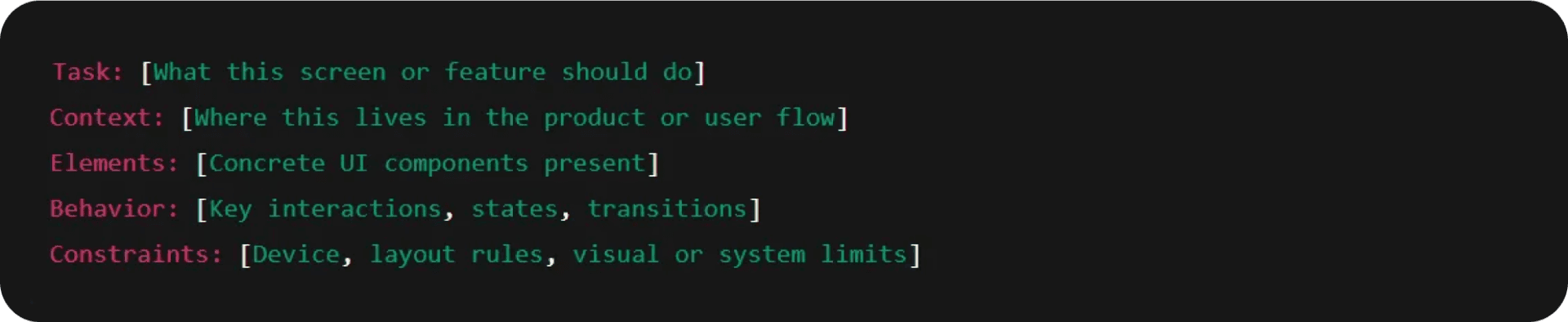
Prompt structure recommended by Make Prompt Assistant 5.2
Generating the complete dashboard with a single prompt
Using a summary of the transcript from the project's first alignment meeting with the team (generated by Gemini) and the GPT Make Prompt Assistant to refine the prompt structure, I generated a single detailed command containing all the information that, in theory, would be needed to produce a good initial version of the dashboard.
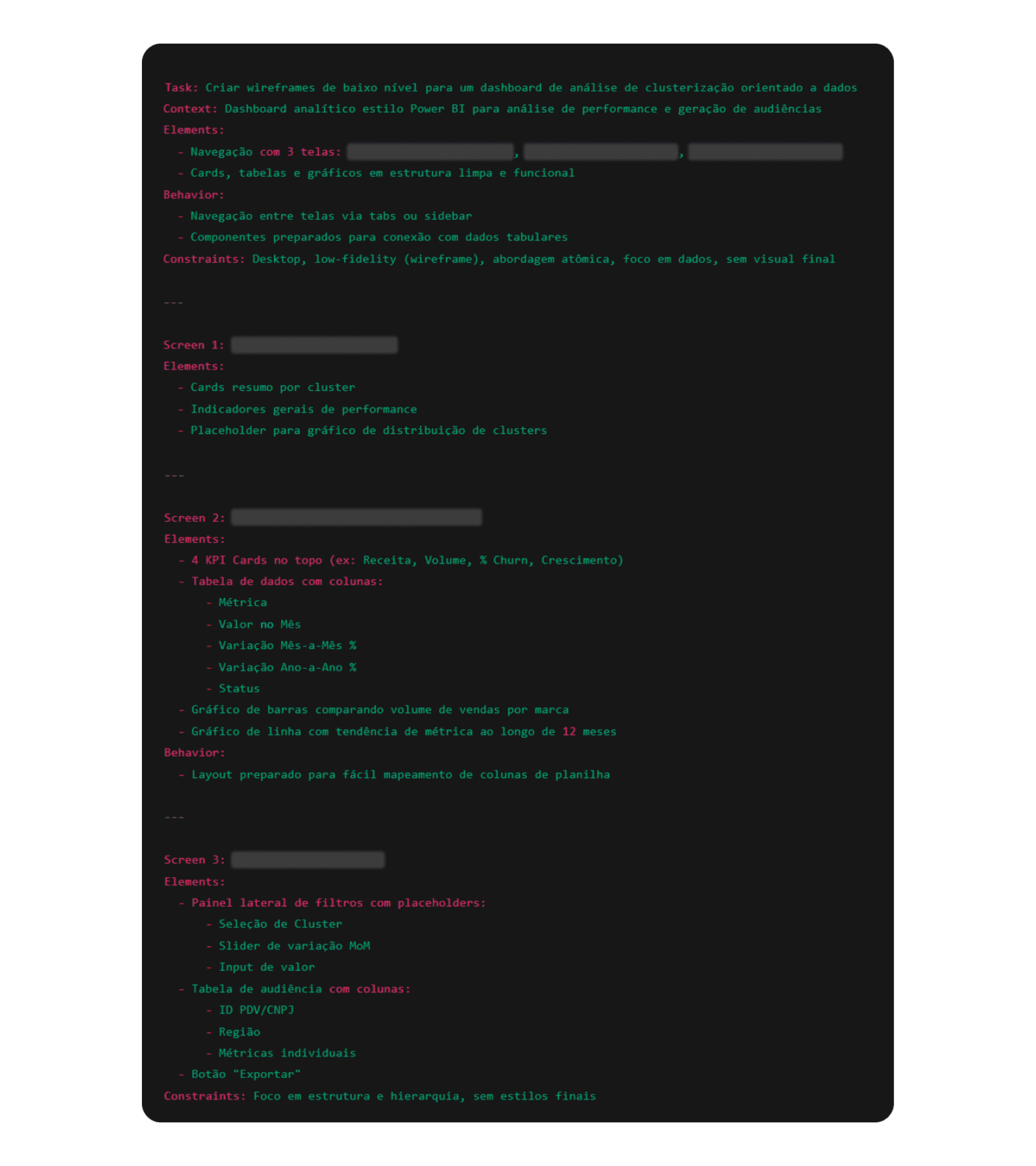
Test 1: Generating an initial version as complete as possible. Some information was omitted to preserve project identification.
This strategy proved effective for quickly obtaining an initial proposal of the information architecture, making it possible to map sections, hierarchies, and main components.
However, it also revealed relevant limitations:
Low level of control during refinement stages;
Implicit decisions made by the AI at points that were not clearly specified;
Difficulty connecting the prototype consistently and reliably to Google Sheets.
Starting with the most complex component + incremental approach
In the second approach, I began the process by instructing the AI to build only a single page, concentrating the effort on the most complex component of the dashboard: the table integrated with the spreadsheet containing real data.
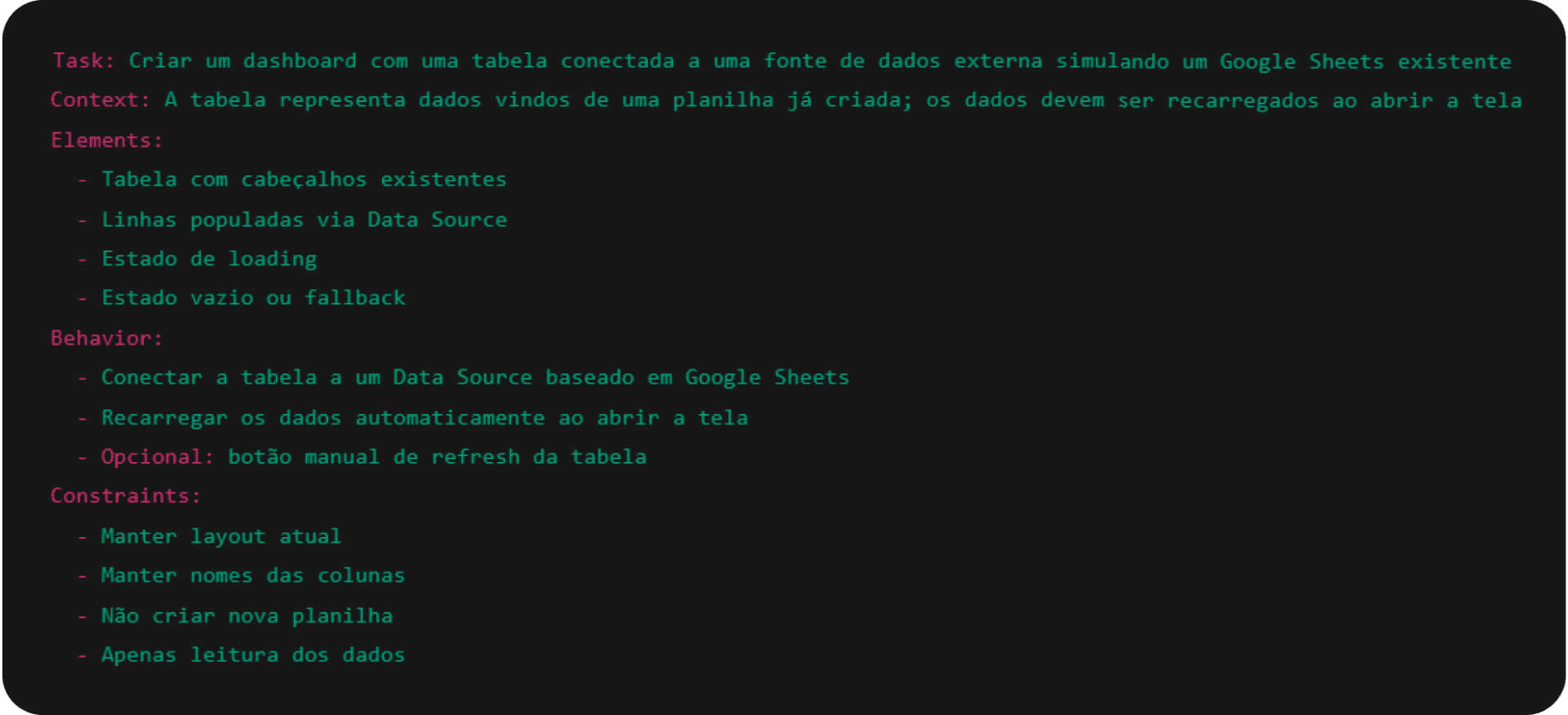
Test 2: Building the most complex component first (built in portuguese).
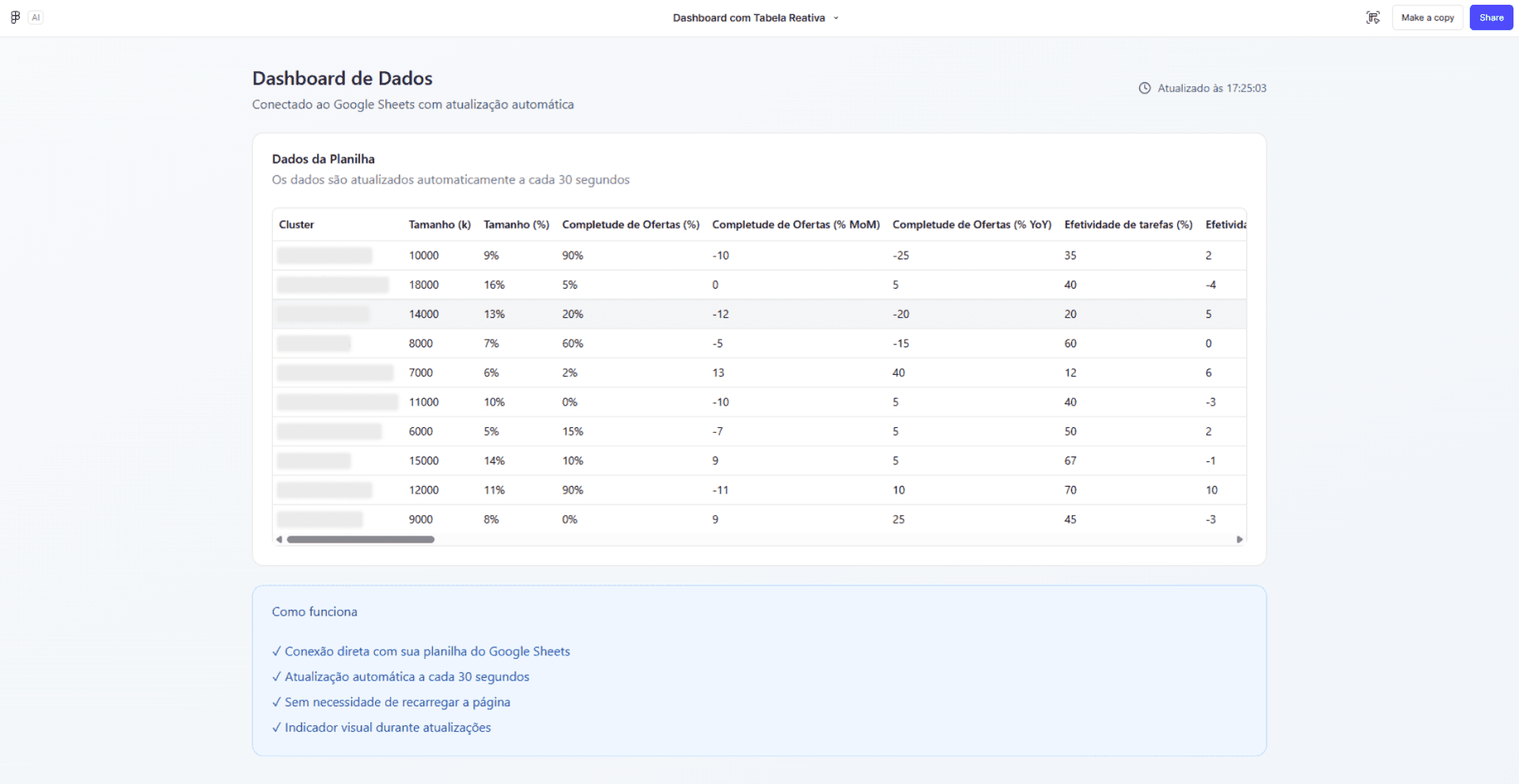
Test 2: Result generated in the first version (built in portuguese)
From that core, subsequent prompts were used to gradually expand the structure, building elements "around" the main component.
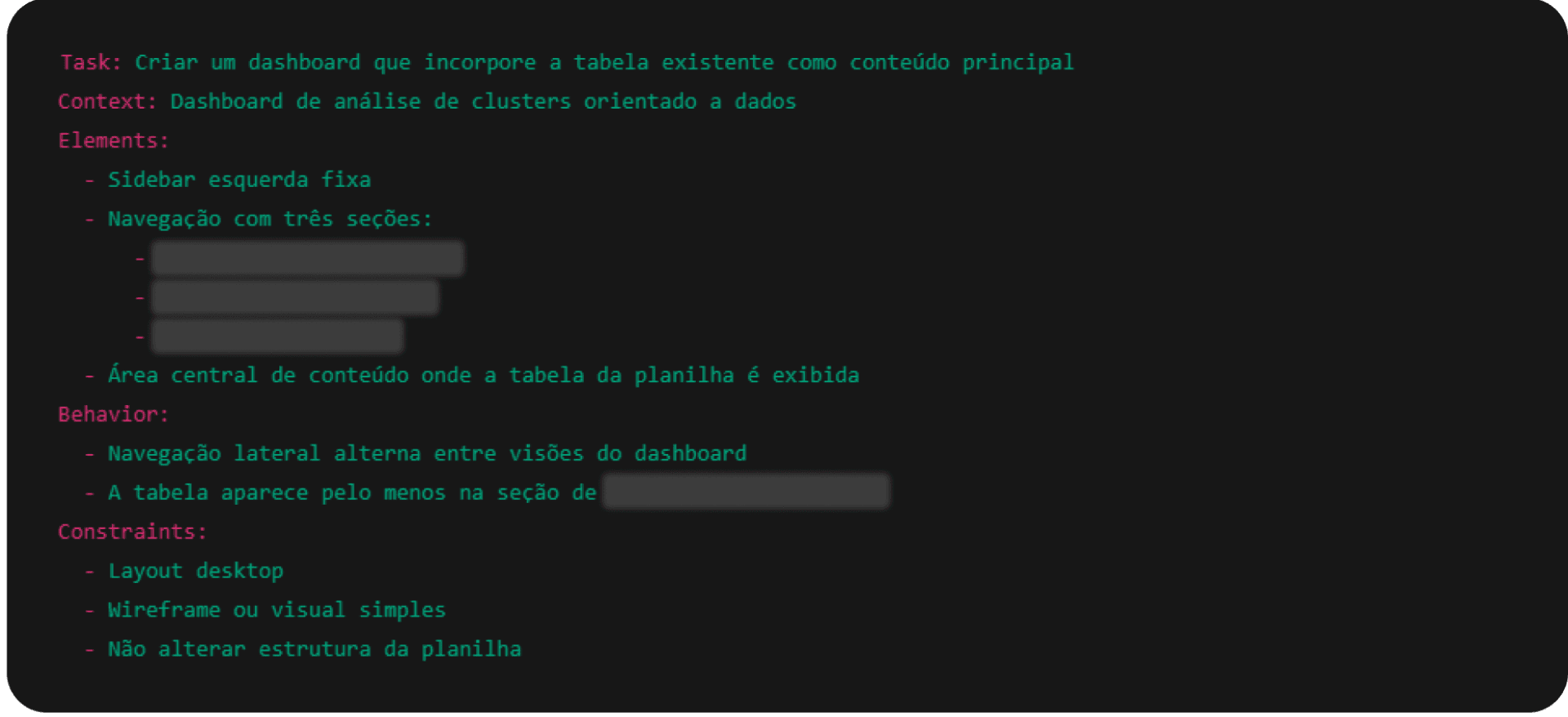
Test 2.2: Prompt used in the sequence. Some information was omitted to preserve the identification of the project.
Test 2.2: Prompt used in sequence. Some information was omitted to preserve project identification.
From the perspective of control, predictability, and the ability to course-correct throughout the process, this strategy was the one that brought me the best results for this challenge. In subsequent prompts, it was possible to establish the navigation structure and add new components progressively, ensuring structural consistency.
Only after the structure was complete did the focus shift to visual aspects and interface refinement, a stage that, I must say, became an exploration in its own right.
It is worth noting that this was a personal experience, guided by a sequence of decisions that made sense in that context. There are certainly other ways to reach the same result. One of the most interesting aspects of this type of project is how much it sparks curiosity about how other people would approach the same problem.
More tests throughout the process
Throughout the two approaches mentioned, I tested different prompt writing strategies, observing how variations in the process impacted the level of control and predictability during prototype construction.
I also explored detailed requirement writing versus less specific commands. Prompts went through cycles of writing, refinement, and review before execution, often with the support of other generative tools, such as ChatGPT and Gemini.
Visual refinement was explored at different levels of specificity, as were situations where gaps were intentionally left to observe how Make made decisions automatically.
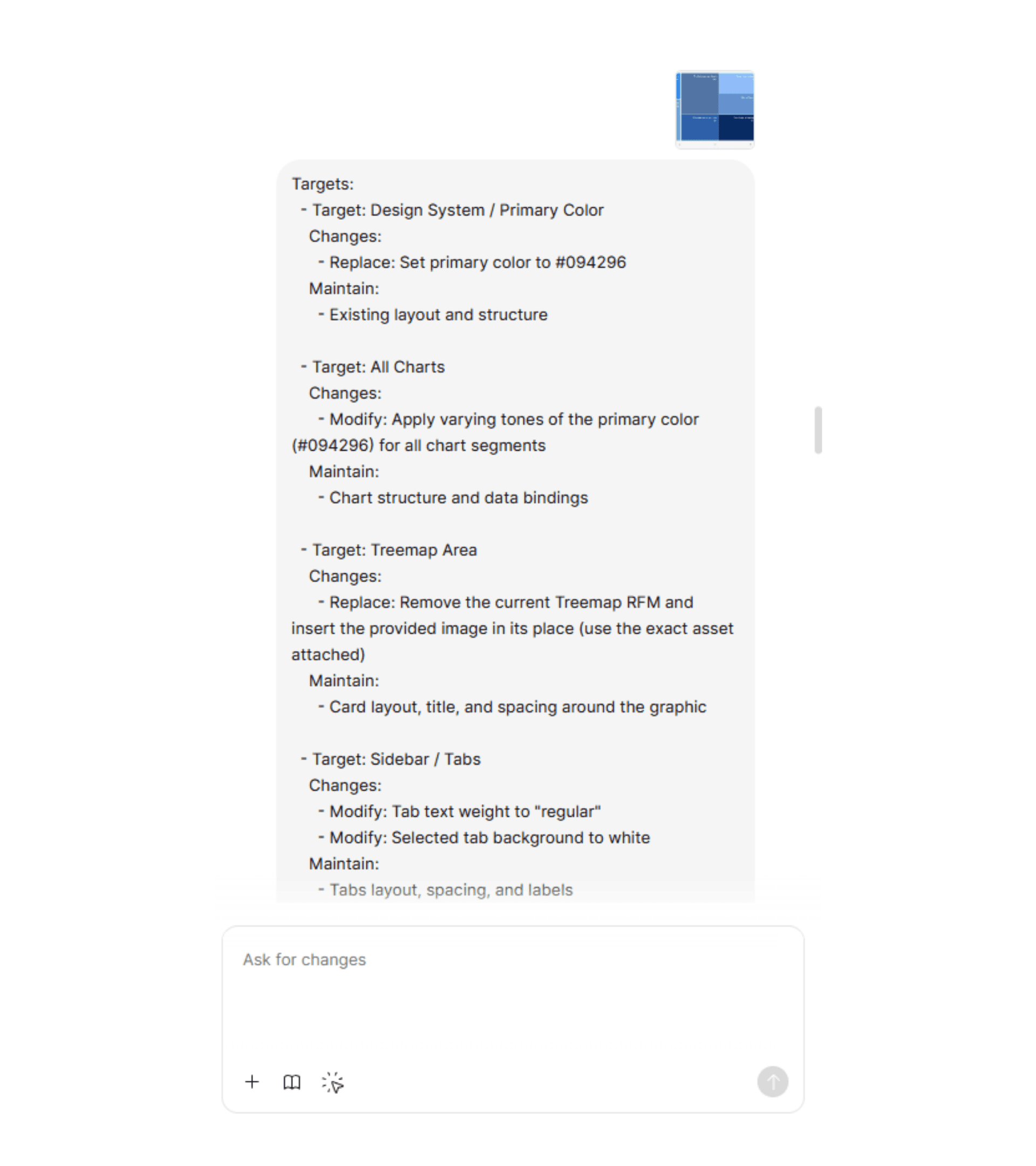
Tests for design improvements of generated components
Finally, the experiment included stating explicit constraints and limitations in the prompts, evaluating how these instructions influenced the tool's behavior across iterations.
4. Learnings
As I mentioned, for my specific challenge, an incremental approach produced better results. Beyond that finding, I share below other learnings and insights gathered throughout the process:
Prototyping with Figma Make vs. "traditional" Figma: The speed with which Figma Make generates hover states, loading states, charts, and component variations is a meaningful differentiator. This makes it possible to test behaviors and use experiences in the early stages, without needing to build everything manually.
Writing and refining prompts beforehand, with LLM support, reduces rework: Using tools like ChatGPT, Gemini, and other AI platforms for business to structure, review, and detail prompts before running them in Make helps organize thinking, eliminate ambiguities, and anticipate decisions that, if left open, would be made automatically by the AI.
Prompt clarity level = result quality level: Perhaps the most important learning from the experiment. AI does not interpret implicit context or vague intentions. The clearer, more specific, and better-structured the prompt, the greater the control over the result. Output quality is directly proportional to input quality.
A single prompt does not solve everything, but successive micro-adjustments are also a problem: Small adjustments without a solid structure generate dozens of new prototype versions and tend to produce inconsistent results over time. Short, direct, yet complete commands (with task, context, elements, behavior, and limitations) result in more coherent and predictable responses.
Data-driven products require extra care: Dashboards, tables, and charts are still challenging to build via prompt. Fine-tuning design in these elements, in some cases, is faster and more precise when done manually.
Visual refinement demands a high degree of specificity: Typography, spacing, colors, hierarchy, and components need to be described precisely. Any unspecified detail becomes an automatic AI decision.
What I have been testing recently
Integrating traditional Figma at intermediate stages: using "classic" Figma as a fine-tuning tool for spacing, visual hierarchy, typography, alignment, and aesthetic micro-decisions. These decisions tend to be more predictable and controllable when made manually.
Building prototypes from an existing style guide: testing rapid screen composition in Figma Make leveraging tokens, typography, colors, and components already defined in the style guide. The idea is to generate consistent layouts, accelerate flow exploration, and reduce repetitive visual decisions — while maintaining visual coherence from the earliest versions.
Continuing to explore integration with other tools: evaluating new possibilities for integration with real data, investigating how external sources and different data formats can be incorporated.
Want to explore how multi-agent systems can complement AI prototyping in the design and product process? See how Ysabella Andrade used synthetic personas to refine prototypes before real tests.
5. The designer's role in the AI era
More than going deeper into a new tool, this experiment reinforced that the value of AI is directly proportional to the clarity, judgment, and repertoire of the person using it. When there is well-defined intention, technology amplifies results. Without it, it only amplifies the noise.
Tools like Figma Make expand possibilities, accelerate cycles, and reduce execution barriers. But what sustains good decisions remains the designer's eye — critical thinking, judgment, and the ability to set direction are essential.
Want to explore how AI can accelerate processes in your project? Schedule a conversation with Taqtile.
Follow Taqtile's next articles on LinkedIn to learn more about our experiments, discussions, and strategies in the use of Artificial Intelligence.